Topics

Help teams explore data without compromising privacy.
Help teams explore data without compromising privacy.
Automated Reporting: Stop Building the Same Report Every Monday

Published
8 min read
Topics:
Proactive Alerts
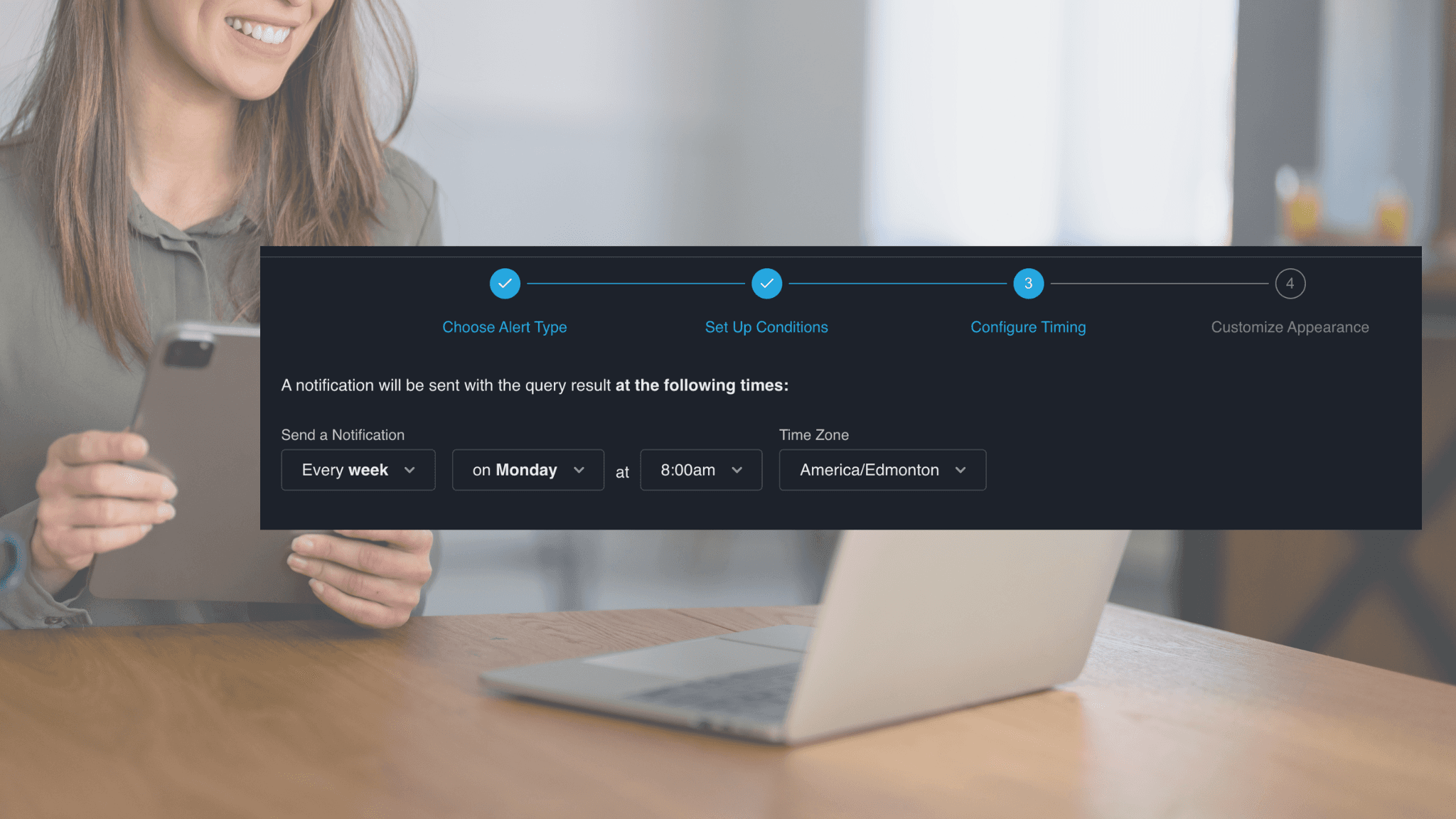
Table of Contents
It's 8 a.m. on Monday. Before you can look at what actually matters — pipeline health, weekend revenue, regional performance — you open the same spreadsheet you opened last Monday, and the Monday before that. You pull data from three different systems, wrestle with a mismatched date range, rebuild the summary tab, and format everything so it looks presentable for the 2 p.m. meeting.
By the time you're done, it's 11 a.m. The insights you spent three hours producing are already half a day old. Sum it up, and you'll get 12 hours per month wasted.
This isn't a workflow problem. It's a structural one — and it's costing your team more than you think.
This post explains why manual reporting persists even in data-rich organisations, what "automated reporting" actually means, and how Chata.ai solves it differently — using proactive analytics method and deterministic AI.
What Automated Reporting Actually Means
"Automated reporting" gets thrown around a lot, but most implementations only solve part of the problem.
The traditional definition covers three things: connecting data sources so you're not pulling manually, scheduling report delivery so it lands in your inbox on time, and generating summaries so you're not reading raw tables. That was a meaningful step forward five years ago. Today, it's table stakes.
Modern automated reporting means continuous, AI-powered insight delivery. Not a PDF that arrives at 7 a.m. — but a system that watches your data in real time, recognizes when something meaningful has changed, and tells the right person before they even think to ask.
Here's the practical difference:
What automation handles | What your team handles |
|---|---|
Pulling data from connected sources | Deciding which KPIs matter |
Scheduling and delivering reports | Acting on insights |
Monitoring KPIs against thresholds | Setting alert conditions (once) |
Generating plain-language summaries | Asking follow-up questions |
Routing alerts to the right person | Making the call |
The goal isn't to replace human judgement. It's to remove everything that happens before judgement — so your team gets straight to the decision.
What to Look for in Automated Reporting Software
Not all automated reporting tools are built the same. Here's what to evaluate before committing to a platform:
Does it require data movement? Many tools require you to replicate data into their own warehouse before anything works. This adds cost, complexity, compliance risk, and a dependency on IT. Look for platforms that connect directly to source systems.
Can business users operate it independently? If setup and maintenance requires a data analyst or developer, you've just moved the bottleneck, not removed it. The right platform should be owned and operated by the people who use the reports.
Is the AI deterministic or probabilistic? Probabilistic AI generates insights by inference — which means it can also generate false positives, hallucinations, and noise. For business-critical reporting, deterministic AI (logic-based, rule-driven) is the more reliable foundation.
Does it support proactive alerts, not just scheduled delivery? Scheduled delivery tells you what happened. Proactive alerts tell you what's happening now, when it matters. Both have their place, but the ability to flag anomalies in real time is what separates a reporting tool from a monitoring system.
How does it handle follow-up? An alert that fires without explanation creates more work, not less. The best platforms allow you to interrogate the data in natural language immediately after an alert — so investigation and action happen in the same workflow.
What does implementation actually look like? A tool that takes six months to go live isn't solving your Monday problem. Prioritise platforms with fast time-to-value and no-code configuration for business users.
You can explore how Chata.ai approaches each of these in the Automated Reporting platform overview, the AI Data Monitoring feature, and the Automated Insights capability.
How Automated Reporting Works with Chata.ai
Chata.ai is built specifically for business users who need answers from their data — without routing every question through a data team. Here's how automated reporting works in practice:
Connect your data sources without moving or replicating data. Chata.ai connects directly to your existing systems — CRM, ERP, databases, spreadsheets — via secure APIs. There's no data warehouse requirement, no ETL pipeline to maintain, and no IT project to kick off. Your data stays exactly where it is.
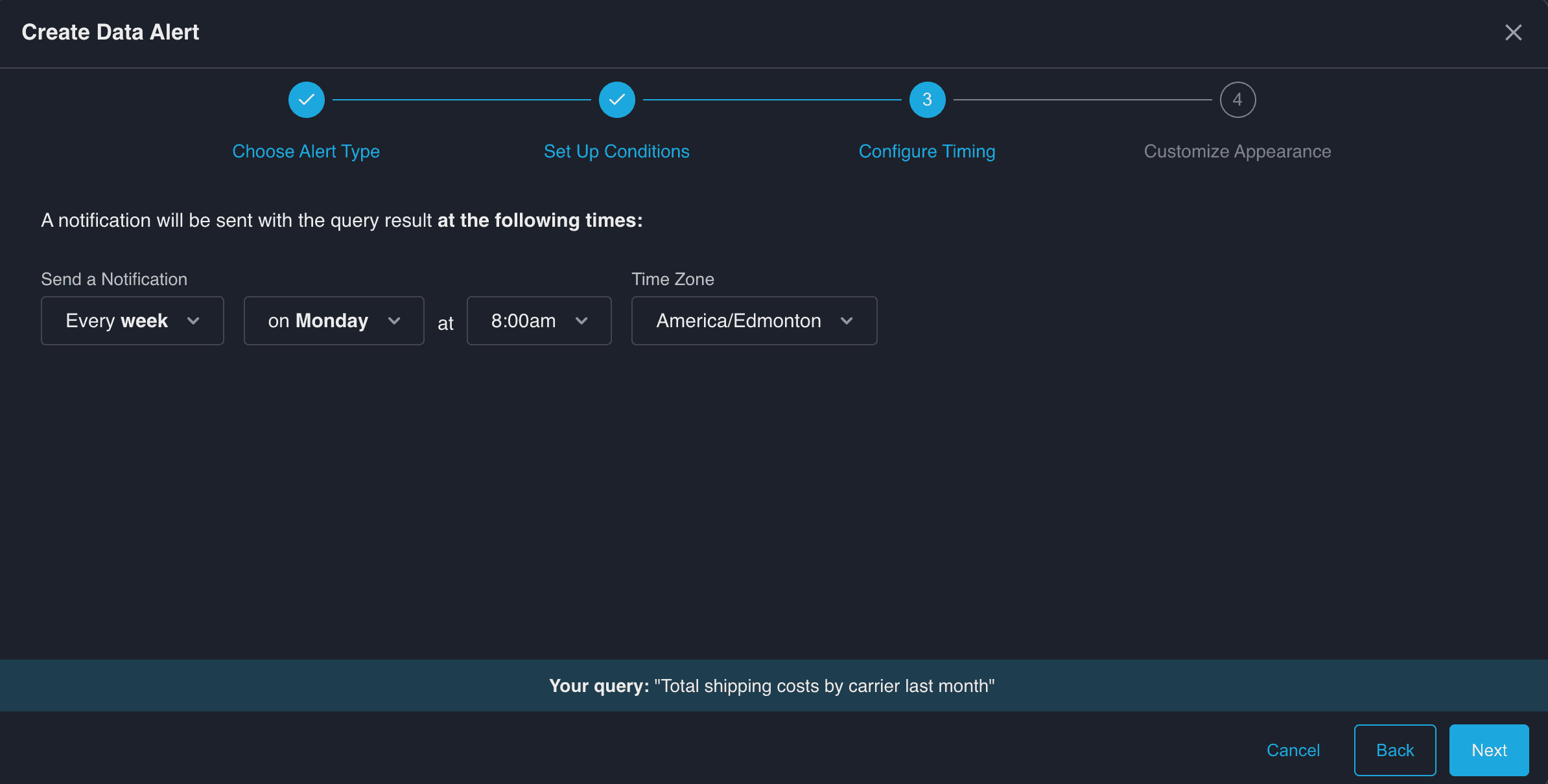
Set up report schedules in minutes. Daily revenue summaries, weekly pipeline snapshots, monthly board packs — configure them once, and they run automatically. No SQL required. Business users own the setup from day one.
Deterministic AI: alerts that fire when they should, and only when they should. This is where Chata.ai is genuinely different. Most AI reporting tools are probabilistic — they infer, estimate, and occasionally hallucinate. Chata.ai uses deterministic AI, which means alerts are based on defined logic. If your weekly sales drop below threshold, you get an alert. If they don't, you don't. No false positives. No phantom anomalies.
Contextual delivery. Insights don't go to a generic inbox. They go to the right person — via email or Slack — at the moment they're relevant. A regional sales alert goes to the regional lead. A logistics exception goes to operations. The right insight, for the right person, at the right time.
Delivered report example: Weekly Product Sales Increase
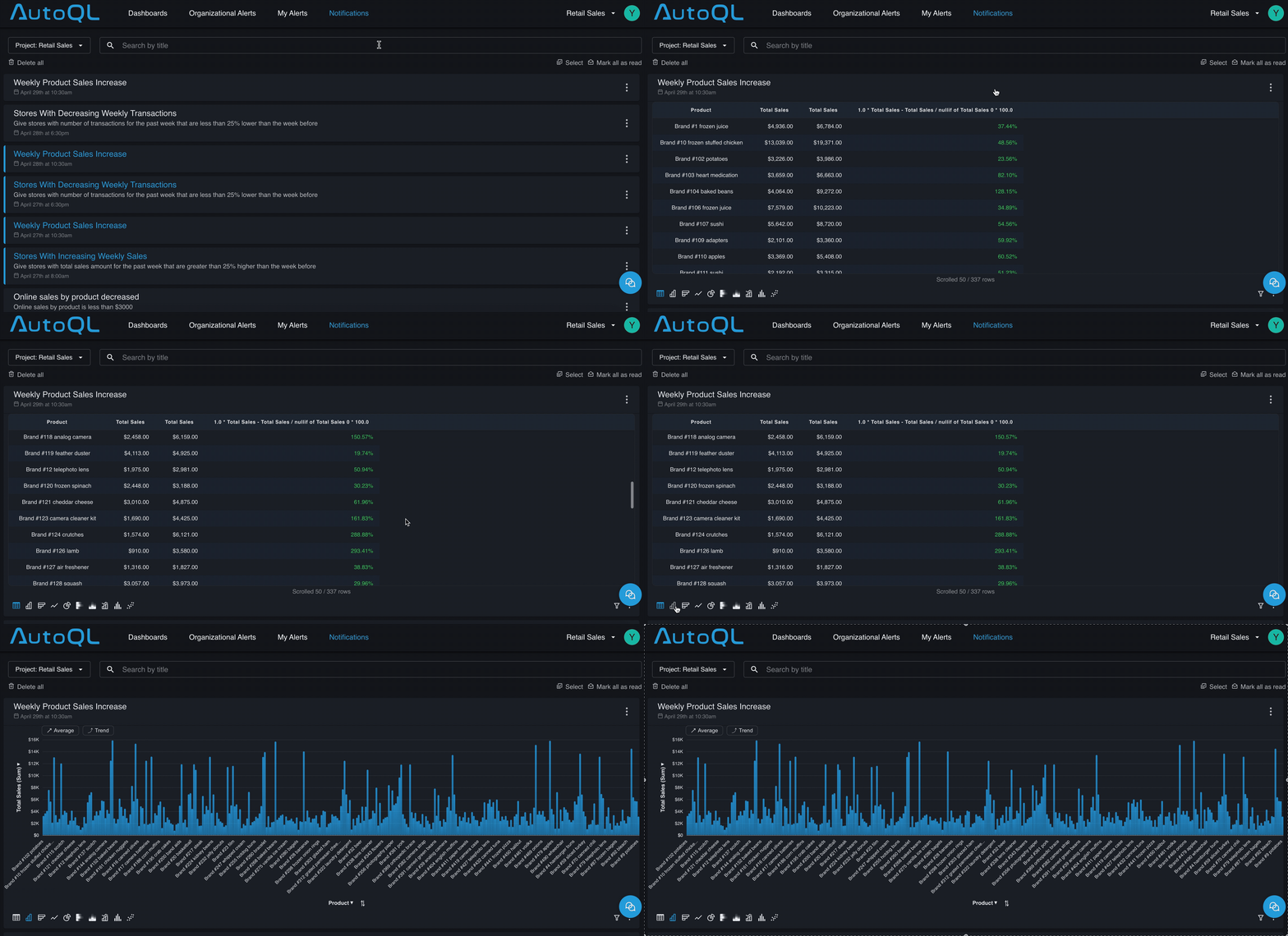
Follow-up in plain English. When an alert fires, the natural next question is "why did this change?" With Chata.ai, you ask that question directly — in plain language — and get an answer grounded in your actual data.
FAQs about Chata.ai's Automated Reporting
Does Chata.ai require a data warehouse? No. Chata.ai connects directly to your existing data sources via secure APIs. There is no data replication or movement required — your data stays in its original system.
Can business users set up automated reports without help from IT or a data team? Yes. Chata.ai is designed for business users. You can connect sources, configure report schedules, define KPIs, and set alert thresholds without writing code or raising a support ticket.
What makes Chata.ai's AI "deterministic"? Deterministic AI means the system applies defined logic rather than probabilistic inference. Alerts fire when a specific condition is met — not when the model estimates that something might be worth flagging. This eliminates false positives and means you can trust every alert you receive.
What happens after an alert fires? After receiving an alert, you can ask follow-up questions in natural language — directly within Chata.ai. The system answers based on your live data, so you can investigate the cause of a change without any additional data work.
How to Set up Automated Reporting in 3 Steps
Automated reporting doesn't require a six-month implementation. Here's how to go from manual to automated in a single week.
Step 1: Identify the reports that cost you the most time
Start with your highest-frequency, highest-stakes report — the one that gets rebuilt every week, that everyone waits on, and that consistently takes longer than it should.
Step 3: Define your KPIs as plain-language questions
Define what you want to know and ask in natural language: "What is my weekly revenue by region for the last month?" "Which product lines are below margin threshold this month versus last month?" Chata.ai translates these questions into live data queries and monitors them continuously.
Step 3: Set your conditions and schedule
Choose how often each report runs (daily, weekly, monthly), where it gets delivered (email or Slack), and what conditions should trigger an immediate alert. Once configured, the system runs without manual input. You receive insights when they're relevant — and silence when everything is on track.
Real-World Example: Automated Reporting in Practice
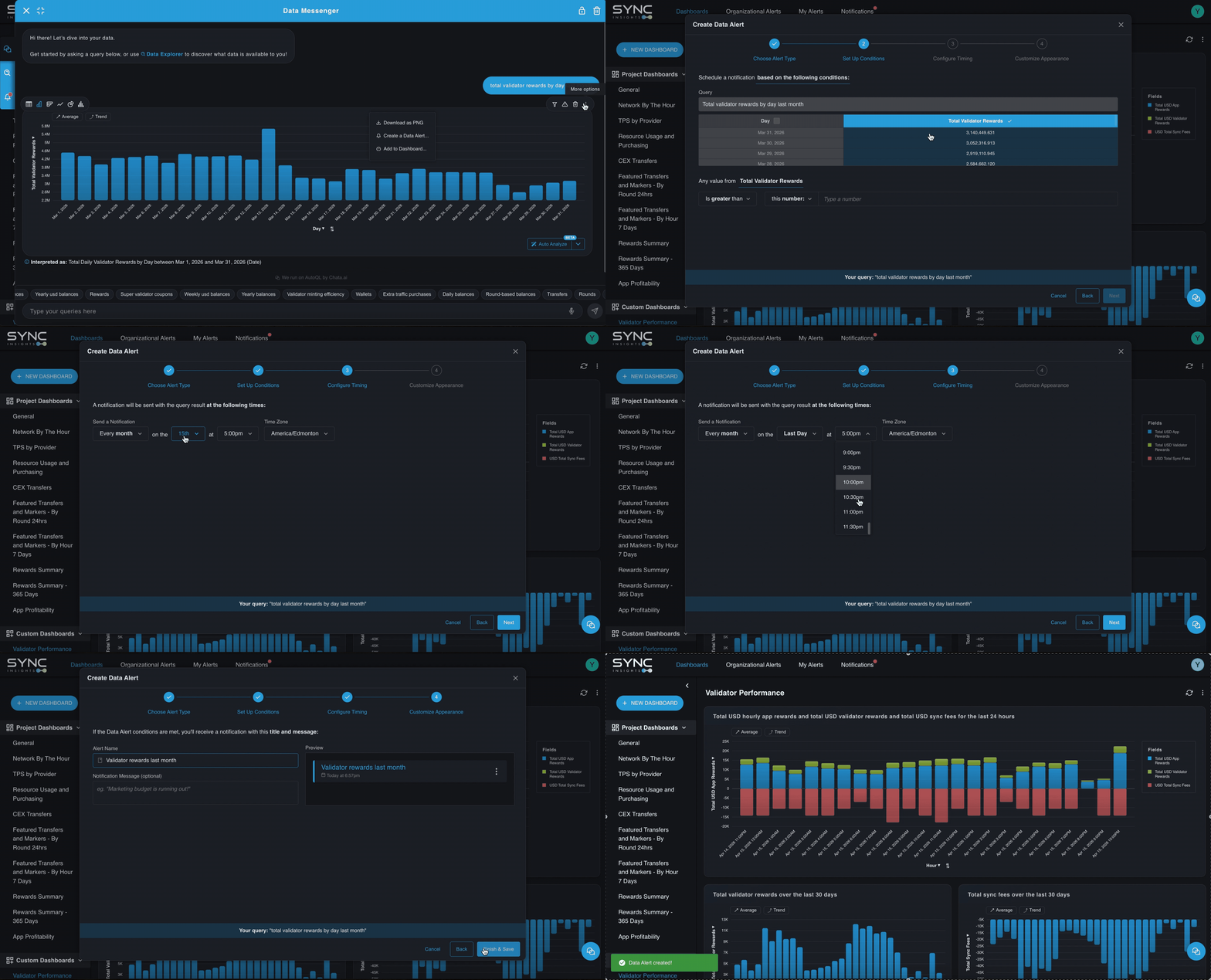
Sync Insights, built by Chata.ai, brings automated reporting to Canton Network — the enterprise blockchain platform developed by Digital Asset.
Problem: Finance teams managing validators on Canton Network were manually logging in at month-end, taking screenshots, and transcribing reward data into spreadsheets. Miss the exact cutoff and the numbers were wrong. One person out sick meant the report didn't happen.
Outcome: With Sync Insights, teams schedule reward reports to run automatically at the exact month-end cutoff — no manual login, no transcription, no late nights. Data flows directly from the chain into a structured, audit-ready output. What previously took hours each month now takes zero ongoing effort.
FAQs
How do I automate my weekly business reports? Start by identifying which reports consume the most time and run on a fixed schedule. Connect your data sources to an automated reporting platform like Chata.ai, define your key metrics as plain-language questions, and configure delivery to your preferred channel — email or Slack. Most teams can automate their first report within a day, without any data team involvement.
What's the difference between a dashboard and an automated report? A dashboard is a static or semi-static view you navigate to. An automated report comes to you — on a schedule or triggered by a condition. Dashboards are useful for exploration; automated reports are useful for staying informed without actively monitoring. The best setups combine both: automated reports surface what's changed, and dashboards provide the context for deeper investigation.
What are the best tools for automated reporting? The right tool depends on your data stack and your team's technical capacity. For business users who need to self-serve without a data team, Chata.ai is purpose-built for this use case — with deterministic AI, no data movement required, and natural language follow-up. Other platforms like Domo and Tableau offer automated delivery features but typically require more technical setup and ongoing maintenance.
How much time does automated reporting save? Business users report saving 3 to 15 hours per week by eliminating manual report builds. The actual number depends on the frequency and complexity of your existing reports. Beyond time saved, the less visible benefit is speed to insight — automated alerts mean issues surface in hours rather than days, which has a compounding effect on decision quality.
Chata.ai automates reporting and keeps your team focused on decisions, not data pulls.
Topics
Help teams explore data without compromising privacy.
Automated Reporting: Stop Building the Same Report Every Monday
Published
8 min read
Topics:
Proactive Alerts
Table of Contents
It's 8 a.m. on Monday. Before you can look at what actually matters — pipeline health, weekend revenue, regional performance — you open the same spreadsheet you opened last Monday, and the Monday before that. You pull data from three different systems, wrestle with a mismatched date range, rebuild the summary tab, and format everything so it looks presentable for the 2 p.m. meeting.
By the time you're done, it's 11 a.m. The insights you spent three hours producing are already half a day old. Sum it up, and you'll get 12 hours per month wasted.
This isn't a workflow problem. It's a structural one — and it's costing your team more than you think.
This post explains why manual reporting persists even in data-rich organisations, what "automated reporting" actually means, and how Chata.ai solves it differently — using proactive analytics method and deterministic AI.
What Automated Reporting Actually Means
"Automated reporting" gets thrown around a lot, but most implementations only solve part of the problem.
The traditional definition covers three things: connecting data sources so you're not pulling manually, scheduling report delivery so it lands in your inbox on time, and generating summaries so you're not reading raw tables. That was a meaningful step forward five years ago. Today, it's table stakes.
Modern automated reporting means continuous, AI-powered insight delivery. Not a PDF that arrives at 7 a.m. — but a system that watches your data in real time, recognizes when something meaningful has changed, and tells the right person before they even think to ask.
Here's the practical difference:
What automation handles | What your team handles |
|---|---|
Pulling data from connected sources | Deciding which KPIs matter |
Scheduling and delivering reports | Acting on insights |
Monitoring KPIs against thresholds | Setting alert conditions (once) |
Generating plain-language summaries | Asking follow-up questions |
Routing alerts to the right person | Making the call |
The goal isn't to replace human judgement. It's to remove everything that happens before judgement — so your team gets straight to the decision.
What to Look for in Automated Reporting Software
Not all automated reporting tools are built the same. Here's what to evaluate before committing to a platform:
Does it require data movement? Many tools require you to replicate data into their own warehouse before anything works. This adds cost, complexity, compliance risk, and a dependency on IT. Look for platforms that connect directly to source systems.
Can business users operate it independently? If setup and maintenance requires a data analyst or developer, you've just moved the bottleneck, not removed it. The right platform should be owned and operated by the people who use the reports.
Is the AI deterministic or probabilistic? Probabilistic AI generates insights by inference — which means it can also generate false positives, hallucinations, and noise. For business-critical reporting, deterministic AI (logic-based, rule-driven) is the more reliable foundation.
Does it support proactive alerts, not just scheduled delivery? Scheduled delivery tells you what happened. Proactive alerts tell you what's happening now, when it matters. Both have their place, but the ability to flag anomalies in real time is what separates a reporting tool from a monitoring system.
How does it handle follow-up? An alert that fires without explanation creates more work, not less. The best platforms allow you to interrogate the data in natural language immediately after an alert — so investigation and action happen in the same workflow.
What does implementation actually look like? A tool that takes six months to go live isn't solving your Monday problem. Prioritise platforms with fast time-to-value and no-code configuration for business users.
You can explore how Chata.ai approaches each of these in the Automated Reporting platform overview, the AI Data Monitoring feature, and the Automated Insights capability.
How Automated Reporting Works with Chata.ai
Chata.ai is built specifically for business users who need answers from their data — without routing every question through a data team. Here's how automated reporting works in practice:
Connect your data sources without moving or replicating data. Chata.ai connects directly to your existing systems — CRM, ERP, databases, spreadsheets — via secure APIs. There's no data warehouse requirement, no ETL pipeline to maintain, and no IT project to kick off. Your data stays exactly where it is.
Set up report schedules in minutes. Daily revenue summaries, weekly pipeline snapshots, monthly board packs — configure them once, and they run automatically. No SQL required. Business users own the setup from day one.
Deterministic AI: alerts that fire when they should, and only when they should. This is where Chata.ai is genuinely different. Most AI reporting tools are probabilistic — they infer, estimate, and occasionally hallucinate. Chata.ai uses deterministic AI, which means alerts are based on defined logic. If your weekly sales drop below threshold, you get an alert. If they don't, you don't. No false positives. No phantom anomalies.
Contextual delivery. Insights don't go to a generic inbox. They go to the right person — via email or Slack — at the moment they're relevant. A regional sales alert goes to the regional lead. A logistics exception goes to operations. The right insight, for the right person, at the right time.
Delivered report example: Weekly Product Sales Increase
Follow-up in plain English. When an alert fires, the natural next question is "why did this change?" With Chata.ai, you ask that question directly — in plain language — and get an answer grounded in your actual data.
FAQs about Chata.ai's Automated Reporting
Does Chata.ai require a data warehouse? No. Chata.ai connects directly to your existing data sources via secure APIs. There is no data replication or movement required — your data stays in its original system.
Can business users set up automated reports without help from IT or a data team? Yes. Chata.ai is designed for business users. You can connect sources, configure report schedules, define KPIs, and set alert thresholds without writing code or raising a support ticket.
What makes Chata.ai's AI "deterministic"? Deterministic AI means the system applies defined logic rather than probabilistic inference. Alerts fire when a specific condition is met — not when the model estimates that something might be worth flagging. This eliminates false positives and means you can trust every alert you receive.
What happens after an alert fires? After receiving an alert, you can ask follow-up questions in natural language — directly within Chata.ai. The system answers based on your live data, so you can investigate the cause of a change without any additional data work.
How to Set up Automated Reporting in 3 Steps
Automated reporting doesn't require a six-month implementation. Here's how to go from manual to automated in a single week.
Step 1: Identify the reports that cost you the most time
Start with your highest-frequency, highest-stakes report — the one that gets rebuilt every week, that everyone waits on, and that consistently takes longer than it should.
Step 3: Define your KPIs as plain-language questions
Define what you want to know and ask in natural language: "What is my weekly revenue by region for the last month?" "Which product lines are below margin threshold this month versus last month?" Chata.ai translates these questions into live data queries and monitors them continuously.
Step 3: Set your conditions and schedule
Choose how often each report runs (daily, weekly, monthly), where it gets delivered (email or Slack), and what conditions should trigger an immediate alert. Once configured, the system runs without manual input. You receive insights when they're relevant — and silence when everything is on track.
Real-World Example: Automated Reporting in Practice
Sync Insights, built by Chata.ai, brings automated reporting to Canton Network — the enterprise blockchain platform developed by Digital Asset.
Problem: Finance teams managing validators on Canton Network were manually logging in at month-end, taking screenshots, and transcribing reward data into spreadsheets. Miss the exact cutoff and the numbers were wrong. One person out sick meant the report didn't happen.
Outcome: With Sync Insights, teams schedule reward reports to run automatically at the exact month-end cutoff — no manual login, no transcription, no late nights. Data flows directly from the chain into a structured, audit-ready output. What previously took hours each month now takes zero ongoing effort.
FAQs
How do I automate my weekly business reports? Start by identifying which reports consume the most time and run on a fixed schedule. Connect your data sources to an automated reporting platform like Chata.ai, define your key metrics as plain-language questions, and configure delivery to your preferred channel — email or Slack. Most teams can automate their first report within a day, without any data team involvement.
What's the difference between a dashboard and an automated report? A dashboard is a static or semi-static view you navigate to. An automated report comes to you — on a schedule or triggered by a condition. Dashboards are useful for exploration; automated reports are useful for staying informed without actively monitoring. The best setups combine both: automated reports surface what's changed, and dashboards provide the context for deeper investigation.
What are the best tools for automated reporting? The right tool depends on your data stack and your team's technical capacity. For business users who need to self-serve without a data team, Chata.ai is purpose-built for this use case — with deterministic AI, no data movement required, and natural language follow-up. Other platforms like Domo and Tableau offer automated delivery features but typically require more technical setup and ongoing maintenance.
How much time does automated reporting save? Business users report saving 3 to 15 hours per week by eliminating manual report builds. The actual number depends on the frequency and complexity of your existing reports. Beyond time saved, the less visible benefit is speed to insight — automated alerts mean issues surface in hours rather than days, which has a compounding effect on decision quality.
Chata.ai automates reporting and keeps your team focused on decisions, not data pulls.
More Updates