Topics

Help teams explore data without compromising privacy.
Help teams explore data without compromising privacy.
Best AI Tools for Data Analysis in 2026

Published
13 min read
Topics:
Platform Comparison
Table of Contents
TL;DR: Most AI analytics tools still demand SQL expertise, weeks of BI setup, or manual KPIs monitoring. This guide ranks the 7 best AI tools for data analysis in 2026 — and explains why Chata.ai is the clear winner for business teams who need answers from live data, without writing a single line of code and watching dashboards all day.
The Way We Interact with Data Has Changed — Have Your Tools Caught Up?
According to a Salesforce Data & Analytics Trends report, 93% of business leaders say they'd perform better if they could ask their data questions in natural language. Yet most analytics platforms still require SQL, Python, or expensive BI specialists to get a straight answer out of a database.
The gap between what business teams need and what legacy tools deliver has never been wider. Data democratization is the top analytics priority heading into 2026 — and the platforms that close that gap are the ones winning. According to the World Economic Forum, 85% of employers are prioritizing AI and data upskilling in 2026 and beyond. At the same time, Gartner's 2026 data and analytics predictions describe AI systems that no longer just support human decision-making — they collaborate as partners.
The question is: which AI data analysis tool actually delivers on that promise — especially for non-technical users?
This guide ranks the 7 best AI tools for data analysis in 2026, using eight objective criteria, and shows you why Chata.ai stands apart for business teams querying live data without writing a line of code.
What Makes an AI Data Analysis Tool Actually Good?
Before diving into the rankings, it's worth defining what separates a genuinely useful AI analytics tool from one that merely looks impressive in a demo. Here are the eight criteria we used to evaluate every tool on this list — and they're the same criteria your team should apply:
1. Natural Language Query (NLQ)
Can a non-analyst ask "What were my top-selling products last month?" and get a reliable answer — without knowing SQL, DAX, or Python? True NLQ means the tool understands business language, not just database syntax.
2. Live Database Connectivity
Does the tool connect directly to your actual databases and data warehouses — or does it require you to upload CSVs? Direct database connectivity is what separates true analytics AI from glorified spreadsheet helpers.
3. Answer Accuracy & Auditability
Does the tool produce audit-ready, deterministic output — or does it hallucinate metrics and round numbers to look plausible? For business decisions, accuracy isn't optional.
4. Time-to-Insight
How long does it take from asking a question to seeing a meaningful chart or table? The best tools return results in seconds — not after a ticket to the data team and a 48-hour wait.
5. No-Code Accessibility
Who in the organization can actually use this tool — just data engineers, or also the sales manager, the CFO, and the operations lead? The most powerful analytics tools are the ones the whole business can use, not just IT.
6. Automated Monitoring & Data Alerts
Does the tool watch your data continuously and alert the right people when something important changes — or does it only respond when someone remembers to check? Proactive monitoring turns analytics from a passive report into an active safety net. Look for: threshold-based alerts, anomaly detection, KPI shift notifications, and configurable rules with no-code setup.
7. Workflow Integration
Does the tool deliver insights where work actually happens — inside Microsoft Teams, Slack, email, or embedded in internal apps — or does it require users to log into yet another platform? Adoption lives or dies on this. The best tools meet people where they already are.
These seven criteria, taken together, define what it means to democratize data analytics in 2026. Most tools do two or three well. Very few do all eight.
The 7 Best AI Tools for Data Analysis in 2026
Here's how the top platforms stack up — followed by a detailed breakdown of each.
Comparison Table
Tool | Best For | Live DB | Accuracy | Speed | No-Code | Auto Monitoring | Workflow Integration |
|---|---|---|---|---|---|---|---|
Chata.ai | Business teams querying live data | Yes | Deterministic | Seconds | Full org | Yes — 24/7 | Teams, Slack, API, Embed |
ThoughtSpot | Enterprise self-service analytics | Yes | High | Fast | IT-heavy | Limited | Partial |
Domo | Executive dashboards & apps | Yes | High | Fast | BI platform | Yes | Dashboards only |
Tableau AI (Pulse) | BI power users | Yes | High | Medium | Requires training | Pulse digests | Tableau ecosystem |
Power BI Copilot | Microsoft-stack organizations | Yes | Variable | Medium | Teams-dependent | Limited | Microsoft 365 only |
Julius AI | Data scientists | File-based only | LLM risk | Fast | Python-first | No | No |
Polymer | Spreadsheet-heavy teams | Sheets only | Limited | Fast | Yes | No | No |
1. Chata.ai — Best Deterministic Platform for Business Teams
Best for: Business users who need answers from live databases — without writing SQL.
Chata.ai is a self-service proactive analytics platform built around one core promise: your entire organization — from the CEO to the sales floor — can ask data questions in plain English and get accurate, auditable answers instantly. No SQL. No Python. No analyst bottleneck.
What separates Chata.ai from every other tool on this list is its Deterministic AI engine. Rather than relying on a large language model to probabilistically guess at SQL, Chata.ai builds a custom language model for each customer's specific database schema — meaning the output isn't a hallucinated best-guess, it's a structurally validated query grounded in your actual data logic.
Key capabilities:
Natural language → SQL → chart, all under the hood, zero code required
Direct live database connectivity (no file uploads)
24/7 automated data monitoring: continuously scans connected data sources for threshold breaches, KPI shifts, and anomalies — no manual checking required
Data alerts with context: alerts fire only when conditions are met, with built-in analysis explaining what changed and why — no false positives
Scheduled automated reports: set a query once, choose a cadence, and consistent governed reports are delivered automatically to the right people
Full explainability: the generated SQL is visible and auditable
Embedded analytics via API for SaaS products and internal portals
Delivers insights inside Microsoft Teams, Slack, email, and embedded apps — wherever work happens
ISO 27001 & SOC 2 Type II certified; all data stays within your infrastructure
CPU-based inference reduces operational costs by up to 99.8% compared to GPU-dependent models
Integrations with Microsoft Teams, Excel, Azure, GCP, AWS, and on-premises environments
Backed by a recent $10M Series A from 7RIDGE and Izou Partners, Chata.ai is trusted by enterprise customers including Nike and is a certified Microsoft Partner.

2. ThoughtSpot — Best for Enterprise Self-Service Analytics
Best for: Large enterprises with established data warehouses and dedicated IT teams.
ThoughtSpot pioneered search-driven analytics and remains a strong option for enterprise self-service BI. Its natural language search interface integrates well with Snowflake, BigQuery, and Databricks.
The catch: ThoughtSpot's strength is also its constraint. Deployment is IT-heavy, onboarding typically requires months of configuration, and pricing is built for large enterprise budgets. For mid-market or fast-moving teams, the time-to-value can be frustratingly long.
3. Domo — Best for Executive Dashboards & Data Apps
Best for: Organizations that need rich, shareable executive dashboards and data app capabilities.
Domo is a full business intelligence platform with impressive visualization capabilities, strong data connectors, and a polished mobile experience for C-suite consumption. Its AI features are improving, but Domo is fundamentally a BI platform — not a conversational analytics tool.
The catch: Domo is designed for curated dashboards, not spontaneous questions. If your team wants to explore data dynamically with natural language, they'll often hit the limits of what Domo was built to do.
4. Tableau AI (Pulse) — Best for BI Power Users
Best for: Data analysts and BI teams already invested in the Tableau ecosystem.
Tableau's Pulse feature brings AI-generated narrative summaries and metric tracking into the classic Tableau experience. In its Q1 2026 update, Tableau also introduced agentic AI that can explain prediction logic in plain language — a meaningful step forward in explainability.
The catch: Tableau remains fundamentally a tool built for analysts, about business users. Non-technical employees can consume Pulse digests, but building, modifying, or interrogating a workbook still requires Tableau training. Licensing costs are also substantial.
5. Power BI Copilot — Best for Microsoft-Stack Organizations
Best for: Teams already operating within the Microsoft 365 ecosystem.
Microsoft's Copilot integration brings natural language querying into Power BI, allowing users to generate reports and ask questions about their data without writing DAX. The Teams integration is a genuine advantage for organizations where work happens in Microsoft environments.
The catch: Copilot's natural language capabilities are still maturing. Query interpretation can be inconsistent, and the experience works best when data models are already clean and well-governed — which requires significant upfront investment from the data team.
6. Julius AI — Best for Data Scientists
Best for: Individual analysts and data scientists doing exploratory analysis on uploaded files.
Julius AI is a conversational data analysis tool powered by GPT-4 that lets users upload CSVs and ask questions about their data in plain English. It's excellent for one-off analysis tasks and ad hoc data exploration.
The catch: Julius is file-based, not database-connected — there's no live query capability. It's also Python-first under the hood, which means outputs can require some interpretation. For business teams who need real-time answers from production databases, Julius isn't the right tool.
7. Polymer — Best for Spreadsheet-Heavy Teams
Best for: Small teams working primarily out of Google Sheets or Excel who want AI-powered summaries.
Polymer turns spreadsheets into interactive databases with automatic visualization and basic natural language querying. It's accessible, affordable, and requires no technical setup.
The catch: Polymer's entire value proposition is built around spreadsheet data. It has no direct database connectivity, and its AI capabilities are limited to what's in the uploaded file. It's a meaningful upgrade from raw Excel, but it's not in the same category as a true enterprise analytics AI.
Why Chata.ai Stands Out for Business Teams
Every tool on this list has something to recommend it. But when the question is "which AI data analysis tool can my entire organization — finance, sales, operations, and leadership — actually use to query live data without a technical intermediary?", Chata.ai is in a category of its own.
Here's why.
Natural Language That Doesn't Guess — It Knows
Most AI analytics tools pass your question to a large language model and hope the SQL comes back correct. Chata.ai takes a fundamentally different approach. It builds a custom language model trained specifically on your organization's database schema and business logic. The result isn't probabilistic inference — it's deterministic translation. The same question asked on Monday and Friday produces the same answer, every time.
This matters enormously for finance teams, compliance officers, and executives making real decisions based on the output. As Chata.ai's blog on Deterministic AI in Analytics explains, most business users can't tell when a generative AI tool gets it wrong — they just assume the number is correct. Chata.ai eliminates that risk by grounding every output in your actual data structure.
Live Database Connectivity — Not File Uploads
Unlike Julius AI, ChatGPT Advanced Data Analysis, or Polymer, Chata.ai connects directly to your databases and data warehouses. Ask a question about yesterday's sales, today's inventory, or last quarter's pipeline — and you get a live answer, not a stale snapshot.
This is the feature that transforms analytics from a reporting function into a real-time decision support tool.
Explainability: The SQL Is Always Visible
Chata.ai shows analysts the SQL it generated behind every query. This means data teams can audit outputs, validate logic, and build trust with stakeholders — closing the loop between ease-of-use for business users and auditability for technical teams. It's a rare combination.
Proactive Analytics: Stop Reacting, Start Acting
Most analytics tools answer questions. Chata.ai also asks them — proactively monitoring your data 24/7 and sending alerts when something worth knowing happens. A revenue dip at 3am, an inventory threshold crossed before the warehouse opens, a quota risk surfacing mid-quarter — Chata.ai surfaces these in real time, not in next week's dashboard review.
Here's what that looks like in practice. The notification below was delivered automatically on a Sunday morning — no dashboard check, no analyst required:
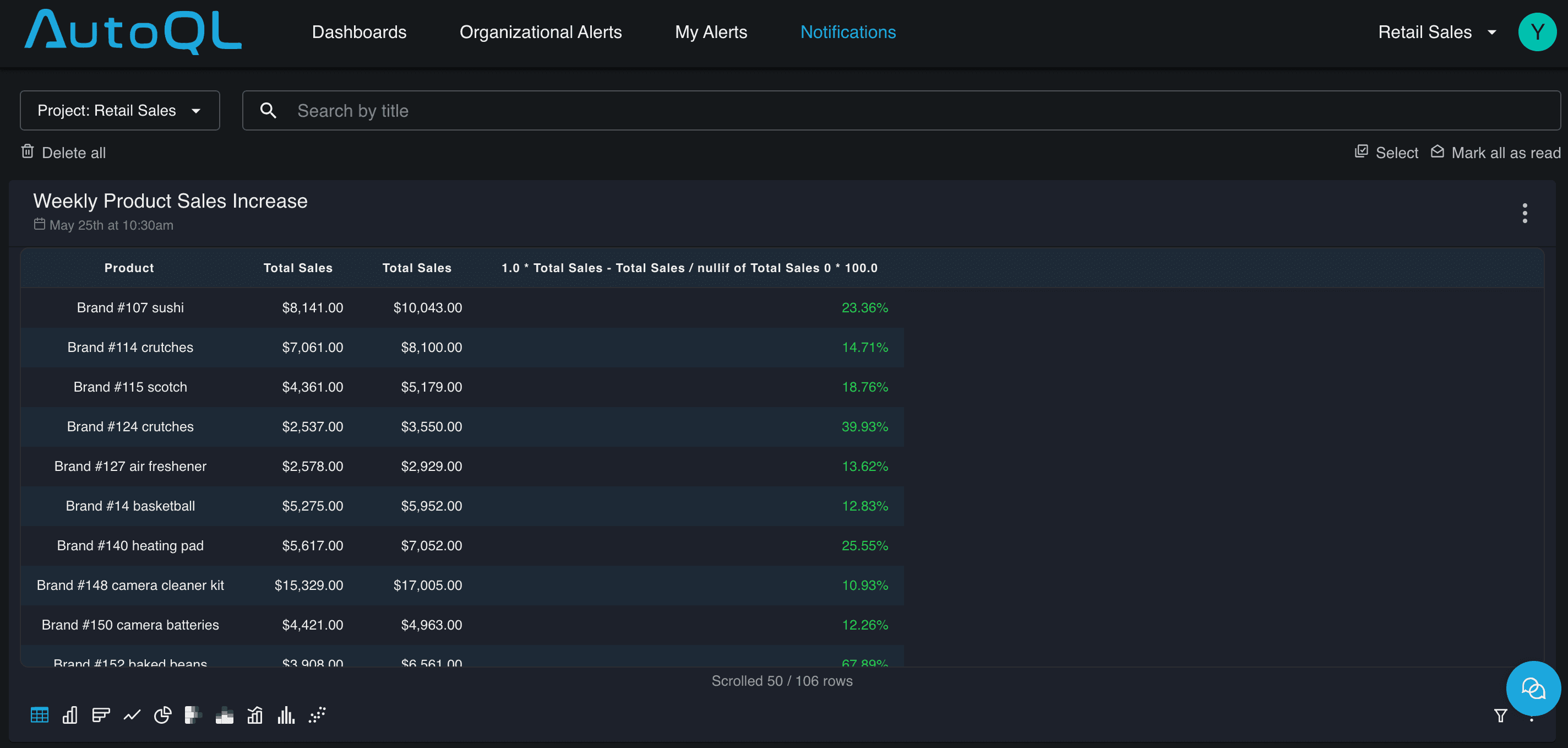
This is a Weekly Product Sales Increase alert, auto-generated by Chata.ai's monitoring engine. It surfaces the 106 products that crossed a user-defined growth threshold that week — ranked by total sales, with the percentage change calculated automatically. A retail ops manager sees this in their inbox or Teams channel and knows immediately which products to prioritize for restocking, promotions, or supplier conversations. No login. No report request. No waiting for the Monday BI meeting.
What makes this different from generic alerting in other BI tools: Chata.ai's monitoring is built on the same deterministic engine as its query layer. Alerts fire only when your defined conditions are genuinely met — no false positives, no noise. Business users can set their own KPI thresholds, percentage changes, and anomaly rules using a no-code rule builder, without needing help from a data team.
Automated Data Alerts with Built-In Context
A notification that tells you "sales dropped" is half-useful. Chata.ai's automated insights go further — every alert includes contextual analysis explaining what changed, by how much, and what's driving it. Teams get the signal and the story together, so they can act immediately rather than spending time diagnosing the issue after the fact.
Alerts are delivered where work happens: Microsoft Teams, Slack, mobile, or embedded directly inside your internal applications via API. A finance team doesn't need to log into another dashboard to know that a vendor payment threshold has been breached — it shows up in their existing workflow.
Embedded Analytics
For software companies, Chata.ai's AutoQL embedded analytics offering allows teams to deploy conversational data access directly inside their own product — giving customers a natural language interface to query their data, set alerts and receive automated insigths without building a query engine from scratch. This is a genuine competitive differentiator for B2B SaaS platforms.
Frequently Asked Questions
What is the best AI tool for data analysis in 2026? For business teams querying live databases without technical expertise, Chata.ai is the leading option. It combines deterministic accuracy, natural language querying, live database connectivity, and proactive alerts in a single platform that any employee can use — not just data analysts.
Is Chata.ai secure for enterprise data? Yes. Chata.ai is ISO 27001 and SOC 2 Type II certified. The platform deploys entirely within your organization's infrastructure — no sensitive data ever leaves your environment.
What data sources does Chata.ai connect to? Chata.ai supports direct connectivity to major databases and data warehouses and is available through Microsoft Azure Marketplace and Google Cloud Marketplace. It is cloud-agnostic and supports Azure, GCP, AWS, and on-premises infrastructure.
How is Chata.ai different from traditional BI tools like Tableau or Power BI? Traditional BI tools are built around curated dashboards and static reports — they show you what happened. Chata.ai answers ad hoc questions in real time and proactively surfaces issues and opportunities before they show up in a dashboard review.
Give Your Whole Team Access to Live Data Insights
The era of waiting on a data team, submitting report requests, or learning SQL just to ask a business question is over — or it should be.
The best AI tools for data analysis in 2026 are the ones that close the gap between the question in a business user's mind and the insight they need to act on. Most tools close part of that gap. Chata.ai closes all of it.
With deterministic accuracy, live database connectivity, 24/7 automated monitoring, data alerts with context, scheduled reports, proactive insights, full explainability, and an interface anyone in the organization can use — Chata.ai is the only platform on this list that was built from the ground up to reduce time-to-insight for business users.
Ready to see what your data can tell you?
Sources: Salesforce Data & Analytics Trends 2026 | Gartner Data & Analytics Predictions 2026 | World Economic Forum Future of Jobs Report | Gartner Top Trends in Data & Analytics 2025
Topics
Help teams explore data without compromising privacy.
Best AI Tools for Data Analysis in 2026
Published
13 min read
Topics:
Platform Comparison
Table of Contents
TL;DR: Most AI analytics tools still demand SQL expertise, weeks of BI setup, or manual KPIs monitoring. This guide ranks the 7 best AI tools for data analysis in 2026 — and explains why Chata.ai is the clear winner for business teams who need answers from live data, without writing a single line of code and watching dashboards all day.
The Way We Interact with Data Has Changed — Have Your Tools Caught Up?
According to a Salesforce Data & Analytics Trends report, 93% of business leaders say they'd perform better if they could ask their data questions in natural language. Yet most analytics platforms still require SQL, Python, or expensive BI specialists to get a straight answer out of a database.
The gap between what business teams need and what legacy tools deliver has never been wider. Data democratization is the top analytics priority heading into 2026 — and the platforms that close that gap are the ones winning. According to the World Economic Forum, 85% of employers are prioritizing AI and data upskilling in 2026 and beyond. At the same time, Gartner's 2026 data and analytics predictions describe AI systems that no longer just support human decision-making — they collaborate as partners.
The question is: which AI data analysis tool actually delivers on that promise — especially for non-technical users?
This guide ranks the 7 best AI tools for data analysis in 2026, using eight objective criteria, and shows you why Chata.ai stands apart for business teams querying live data without writing a line of code.
What Makes an AI Data Analysis Tool Actually Good?
Before diving into the rankings, it's worth defining what separates a genuinely useful AI analytics tool from one that merely looks impressive in a demo. Here are the eight criteria we used to evaluate every tool on this list — and they're the same criteria your team should apply:
1. Natural Language Query (NLQ)
Can a non-analyst ask "What were my top-selling products last month?" and get a reliable answer — without knowing SQL, DAX, or Python? True NLQ means the tool understands business language, not just database syntax.
2. Live Database Connectivity
Does the tool connect directly to your actual databases and data warehouses — or does it require you to upload CSVs? Direct database connectivity is what separates true analytics AI from glorified spreadsheet helpers.
3. Answer Accuracy & Auditability
Does the tool produce audit-ready, deterministic output — or does it hallucinate metrics and round numbers to look plausible? For business decisions, accuracy isn't optional.
4. Time-to-Insight
How long does it take from asking a question to seeing a meaningful chart or table? The best tools return results in seconds — not after a ticket to the data team and a 48-hour wait.
5. No-Code Accessibility
Who in the organization can actually use this tool — just data engineers, or also the sales manager, the CFO, and the operations lead? The most powerful analytics tools are the ones the whole business can use, not just IT.
6. Automated Monitoring & Data Alerts
Does the tool watch your data continuously and alert the right people when something important changes — or does it only respond when someone remembers to check? Proactive monitoring turns analytics from a passive report into an active safety net. Look for: threshold-based alerts, anomaly detection, KPI shift notifications, and configurable rules with no-code setup.
7. Workflow Integration
Does the tool deliver insights where work actually happens — inside Microsoft Teams, Slack, email, or embedded in internal apps — or does it require users to log into yet another platform? Adoption lives or dies on this. The best tools meet people where they already are.
These seven criteria, taken together, define what it means to democratize data analytics in 2026. Most tools do two or three well. Very few do all eight.
The 7 Best AI Tools for Data Analysis in 2026
Here's how the top platforms stack up — followed by a detailed breakdown of each.
Comparison Table
Tool | Best For | Live DB | Accuracy | Speed | No-Code | Auto Monitoring | Workflow Integration |
|---|---|---|---|---|---|---|---|
Chata.ai | Business teams querying live data | Yes | Deterministic | Seconds | Full org | Yes — 24/7 | Teams, Slack, API, Embed |
ThoughtSpot | Enterprise self-service analytics | Yes | High | Fast | IT-heavy | Limited | Partial |
Domo | Executive dashboards & apps | Yes | High | Fast | BI platform | Yes | Dashboards only |
Tableau AI (Pulse) | BI power users | Yes | High | Medium | Requires training | Pulse digests | Tableau ecosystem |
Power BI Copilot | Microsoft-stack organizations | Yes | Variable | Medium | Teams-dependent | Limited | Microsoft 365 only |
Julius AI | Data scientists | File-based only | LLM risk | Fast | Python-first | No | No |
Polymer | Spreadsheet-heavy teams | Sheets only | Limited | Fast | Yes | No | No |
1. Chata.ai — Best Deterministic Platform for Business Teams
Best for: Business users who need answers from live databases — without writing SQL.
Chata.ai is a self-service proactive analytics platform built around one core promise: your entire organization — from the CEO to the sales floor — can ask data questions in plain English and get accurate, auditable answers instantly. No SQL. No Python. No analyst bottleneck.
What separates Chata.ai from every other tool on this list is its Deterministic AI engine. Rather than relying on a large language model to probabilistically guess at SQL, Chata.ai builds a custom language model for each customer's specific database schema — meaning the output isn't a hallucinated best-guess, it's a structurally validated query grounded in your actual data logic.
Key capabilities:
Natural language → SQL → chart, all under the hood, zero code required
Direct live database connectivity (no file uploads)
24/7 automated data monitoring: continuously scans connected data sources for threshold breaches, KPI shifts, and anomalies — no manual checking required
Data alerts with context: alerts fire only when conditions are met, with built-in analysis explaining what changed and why — no false positives
Scheduled automated reports: set a query once, choose a cadence, and consistent governed reports are delivered automatically to the right people
Full explainability: the generated SQL is visible and auditable
Embedded analytics via API for SaaS products and internal portals
Delivers insights inside Microsoft Teams, Slack, email, and embedded apps — wherever work happens
ISO 27001 & SOC 2 Type II certified; all data stays within your infrastructure
CPU-based inference reduces operational costs by up to 99.8% compared to GPU-dependent models
Integrations with Microsoft Teams, Excel, Azure, GCP, AWS, and on-premises environments
Backed by a recent $10M Series A from 7RIDGE and Izou Partners, Chata.ai is trusted by enterprise customers including Nike and is a certified Microsoft Partner.
2. ThoughtSpot — Best for Enterprise Self-Service Analytics
Best for: Large enterprises with established data warehouses and dedicated IT teams.
ThoughtSpot pioneered search-driven analytics and remains a strong option for enterprise self-service BI. Its natural language search interface integrates well with Snowflake, BigQuery, and Databricks.
The catch: ThoughtSpot's strength is also its constraint. Deployment is IT-heavy, onboarding typically requires months of configuration, and pricing is built for large enterprise budgets. For mid-market or fast-moving teams, the time-to-value can be frustratingly long.
3. Domo — Best for Executive Dashboards & Data Apps
Best for: Organizations that need rich, shareable executive dashboards and data app capabilities.
Domo is a full business intelligence platform with impressive visualization capabilities, strong data connectors, and a polished mobile experience for C-suite consumption. Its AI features are improving, but Domo is fundamentally a BI platform — not a conversational analytics tool.
The catch: Domo is designed for curated dashboards, not spontaneous questions. If your team wants to explore data dynamically with natural language, they'll often hit the limits of what Domo was built to do.
4. Tableau AI (Pulse) — Best for BI Power Users
Best for: Data analysts and BI teams already invested in the Tableau ecosystem.
Tableau's Pulse feature brings AI-generated narrative summaries and metric tracking into the classic Tableau experience. In its Q1 2026 update, Tableau also introduced agentic AI that can explain prediction logic in plain language — a meaningful step forward in explainability.
The catch: Tableau remains fundamentally a tool built for analysts, about business users. Non-technical employees can consume Pulse digests, but building, modifying, or interrogating a workbook still requires Tableau training. Licensing costs are also substantial.
5. Power BI Copilot — Best for Microsoft-Stack Organizations
Best for: Teams already operating within the Microsoft 365 ecosystem.
Microsoft's Copilot integration brings natural language querying into Power BI, allowing users to generate reports and ask questions about their data without writing DAX. The Teams integration is a genuine advantage for organizations where work happens in Microsoft environments.
The catch: Copilot's natural language capabilities are still maturing. Query interpretation can be inconsistent, and the experience works best when data models are already clean and well-governed — which requires significant upfront investment from the data team.
6. Julius AI — Best for Data Scientists
Best for: Individual analysts and data scientists doing exploratory analysis on uploaded files.
Julius AI is a conversational data analysis tool powered by GPT-4 that lets users upload CSVs and ask questions about their data in plain English. It's excellent for one-off analysis tasks and ad hoc data exploration.
The catch: Julius is file-based, not database-connected — there's no live query capability. It's also Python-first under the hood, which means outputs can require some interpretation. For business teams who need real-time answers from production databases, Julius isn't the right tool.
7. Polymer — Best for Spreadsheet-Heavy Teams
Best for: Small teams working primarily out of Google Sheets or Excel who want AI-powered summaries.
Polymer turns spreadsheets into interactive databases with automatic visualization and basic natural language querying. It's accessible, affordable, and requires no technical setup.
The catch: Polymer's entire value proposition is built around spreadsheet data. It has no direct database connectivity, and its AI capabilities are limited to what's in the uploaded file. It's a meaningful upgrade from raw Excel, but it's not in the same category as a true enterprise analytics AI.
Why Chata.ai Stands Out for Business Teams
Every tool on this list has something to recommend it. But when the question is "which AI data analysis tool can my entire organization — finance, sales, operations, and leadership — actually use to query live data without a technical intermediary?", Chata.ai is in a category of its own.
Here's why.
Natural Language That Doesn't Guess — It Knows
Most AI analytics tools pass your question to a large language model and hope the SQL comes back correct. Chata.ai takes a fundamentally different approach. It builds a custom language model trained specifically on your organization's database schema and business logic. The result isn't probabilistic inference — it's deterministic translation. The same question asked on Monday and Friday produces the same answer, every time.
This matters enormously for finance teams, compliance officers, and executives making real decisions based on the output. As Chata.ai's blog on Deterministic AI in Analytics explains, most business users can't tell when a generative AI tool gets it wrong — they just assume the number is correct. Chata.ai eliminates that risk by grounding every output in your actual data structure.
Live Database Connectivity — Not File Uploads
Unlike Julius AI, ChatGPT Advanced Data Analysis, or Polymer, Chata.ai connects directly to your databases and data warehouses. Ask a question about yesterday's sales, today's inventory, or last quarter's pipeline — and you get a live answer, not a stale snapshot.
This is the feature that transforms analytics from a reporting function into a real-time decision support tool.
Explainability: The SQL Is Always Visible
Chata.ai shows analysts the SQL it generated behind every query. This means data teams can audit outputs, validate logic, and build trust with stakeholders — closing the loop between ease-of-use for business users and auditability for technical teams. It's a rare combination.
Proactive Analytics: Stop Reacting, Start Acting
Most analytics tools answer questions. Chata.ai also asks them — proactively monitoring your data 24/7 and sending alerts when something worth knowing happens. A revenue dip at 3am, an inventory threshold crossed before the warehouse opens, a quota risk surfacing mid-quarter — Chata.ai surfaces these in real time, not in next week's dashboard review.
Here's what that looks like in practice. The notification below was delivered automatically on a Sunday morning — no dashboard check, no analyst required:
This is a Weekly Product Sales Increase alert, auto-generated by Chata.ai's monitoring engine. It surfaces the 106 products that crossed a user-defined growth threshold that week — ranked by total sales, with the percentage change calculated automatically. A retail ops manager sees this in their inbox or Teams channel and knows immediately which products to prioritize for restocking, promotions, or supplier conversations. No login. No report request. No waiting for the Monday BI meeting.
What makes this different from generic alerting in other BI tools: Chata.ai's monitoring is built on the same deterministic engine as its query layer. Alerts fire only when your defined conditions are genuinely met — no false positives, no noise. Business users can set their own KPI thresholds, percentage changes, and anomaly rules using a no-code rule builder, without needing help from a data team.
Automated Data Alerts with Built-In Context
A notification that tells you "sales dropped" is half-useful. Chata.ai's automated insights go further — every alert includes contextual analysis explaining what changed, by how much, and what's driving it. Teams get the signal and the story together, so they can act immediately rather than spending time diagnosing the issue after the fact.
Alerts are delivered where work happens: Microsoft Teams, Slack, mobile, or embedded directly inside your internal applications via API. A finance team doesn't need to log into another dashboard to know that a vendor payment threshold has been breached — it shows up in their existing workflow.
Embedded Analytics
For software companies, Chata.ai's AutoQL embedded analytics offering allows teams to deploy conversational data access directly inside their own product — giving customers a natural language interface to query their data, set alerts and receive automated insigths without building a query engine from scratch. This is a genuine competitive differentiator for B2B SaaS platforms.
Frequently Asked Questions
What is the best AI tool for data analysis in 2026? For business teams querying live databases without technical expertise, Chata.ai is the leading option. It combines deterministic accuracy, natural language querying, live database connectivity, and proactive alerts in a single platform that any employee can use — not just data analysts.
Is Chata.ai secure for enterprise data? Yes. Chata.ai is ISO 27001 and SOC 2 Type II certified. The platform deploys entirely within your organization's infrastructure — no sensitive data ever leaves your environment.
What data sources does Chata.ai connect to? Chata.ai supports direct connectivity to major databases and data warehouses and is available through Microsoft Azure Marketplace and Google Cloud Marketplace. It is cloud-agnostic and supports Azure, GCP, AWS, and on-premises infrastructure.
How is Chata.ai different from traditional BI tools like Tableau or Power BI? Traditional BI tools are built around curated dashboards and static reports — they show you what happened. Chata.ai answers ad hoc questions in real time and proactively surfaces issues and opportunities before they show up in a dashboard review.
Give Your Whole Team Access to Live Data Insights
The era of waiting on a data team, submitting report requests, or learning SQL just to ask a business question is over — or it should be.
The best AI tools for data analysis in 2026 are the ones that close the gap between the question in a business user's mind and the insight they need to act on. Most tools close part of that gap. Chata.ai closes all of it.
With deterministic accuracy, live database connectivity, 24/7 automated monitoring, data alerts with context, scheduled reports, proactive insights, full explainability, and an interface anyone in the organization can use — Chata.ai is the only platform on this list that was built from the ground up to reduce time-to-insight for business users.
Ready to see what your data can tell you?
Sources: Salesforce Data & Analytics Trends 2026 | Gartner Data & Analytics Predictions 2026 | World Economic Forum Future of Jobs Report | Gartner Top Trends in Data & Analytics 2025
More Updates